For math, physics and engineering students

Handwritten math, checked as you write

Write on your iPad or laptop the way you would on paper. Owla reads each step as you go, stays quiet while it’s right, and points to the step that’s off so you can fix it yourself.

Free to start. Owla Pro is C$12/month. Sign in with Google or email. Sign up through a friend’s referral link and your first month is free. Privacy

  • iPad + Apple Pencil
  • Any modern browser
  • Nothing to install
A student writes 2x + 4 = 6, then 2x = 10. Owla outlines the second line and explains that 4 was added to the right side instead of subtracted, so it should be 2x = 2.
A sign slip, flagged moments after it’s written.

What happens when you write

You never have to stop and type a question. Owla works in the background on the same page you’re writing on.

  1. Write like it’s paper

    Work through your problem by hand, line by line, on a blank page or on top of an imported worksheet or PDF.

  2. Pause, and Owla reads it

    When you stop writing for a moment, Owla reads the new lines and checks them against the steps above.

  3. Only the wrong step is flagged

    Correct lines get a small tick. A step that looks off is highlighted. Tap it for a nudge, a hint, or the full fix.

Check me. Teach me. Challenge me.

One canvas, three ways to get help, depending on whether you’re doing homework, learning something new, or getting ready for a test.

Check me · while you work

Catch the mistake on the line you made it, not at the end

Most mistakes are one small slip: a sign, a missing factor, a wrong substitution. Owla finds that line and gives you a short nudge about it instead of handing you the answer.

  • A short nudge first, so you can find the fix yourself.
  • Show the fix when you want the corrected step.
  • More for a hint, a similar problem or a lesson on it.
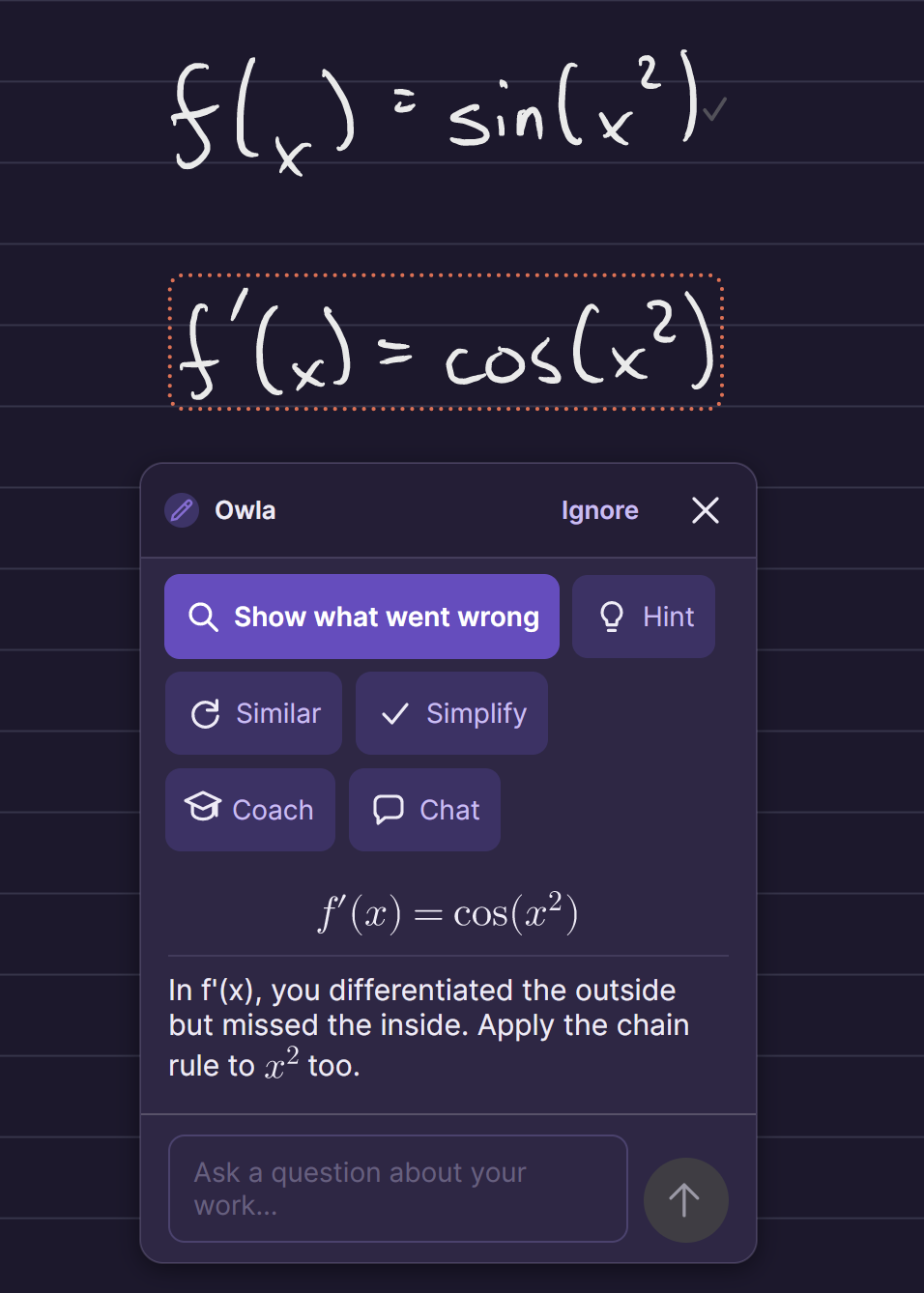
Owla on iPad: f(x) = sin(x squared) has a small grey tick; the next line, f prime of x = cos(x squared), is outlined, and Owla's note says you differentiated the outside but missed the inside, apply the chain rule to x squared too. Buttons: Show what went wrong, Hint, Similar, Simplify, Coach and Chat.

Teach me · when you’re stuck

Stuck on a whole topic? Owla walks you through it

Press Teach me on any page. Owla reads what you’ve written, explains the idea in small steps at your level, then asks you to try the next move by hand so you’re doing the math, not just reading about it.

  • Starts from your own page, not a generic lesson.
  • Quick check questions you answer on the canvas.
  • A wrong answer gets a clearer explanation, not “try again.”

Challenge me · before a test

Practice the topics you actually get wrong

Owla keeps track of the kinds of mistakes you make while you work. Practice turns them into a short drill, hardest topic first, and checks every answer as you write it.

  • Built from your own mistakes, not a random worksheet.
  • Get two right in a row and Owla moves you on.
  • Ends with a summary of what’s solid and what to review.

Built to stay out of your way

A tutor that interrupts every line is worse than no tutor. Owla is designed to speak up rarely, and to be right when it does.

  • Checked twice, flagged once

    Every line is checked on its own and again against the whole page. A mistake is flagged only when Owla is confident, so a flag is worth a look.

  • Ticks, not lectures

    A small grey tick shows a line was checked. A gold check means your final answer is right. No pop-ups, no praise you didn’t ask for.

  • Help without the shortcut

    Owla points you to the problem before it shows you the fix, so you still learn the part you got wrong.

  • Your notes, kept

    Import a worksheet photo or PDF and write on top. Your notebook syncs, so you can start on an iPad and pick it up on a laptop.

Your handwriting is never used to train AI models

What you write is sent to our servers and AI providers to check it, run the tutor and improve Owla’s accuracy. We don’t sell your data or show ads, and you can delete your data or your whole account in Settings at any time. Read the privacy policy

Frequently asked questions

What is Owla?

Owla is a note-taking app with a built-in ink canvas. You write math or engineering work by hand, and Owla reads it in the background and flags the step that looks wrong. It can also teach you a topic step by step and drill the topics you keep missing.

How does Owla check handwritten math?

When you pause, Owla sends an image of what you just wrote to our servers. Each new line is checked twice: once on its own by a model that reads handwriting, and once against the rest of the page so a step is never judged out of context. A mistake is flagged only when Owla is confident.

Does Owla give me the answer?

Not unless you ask. A flag starts with a short nudge so you can find the fix yourself. If you’re still stuck, you can tap More for a hint, or Show the fix to see the corrected step and why.

Is using Owla cheating?

Owla is built for homework, practice and studying, and it doesn’t solve your problem for you unless you ask. Follow your school’s rules: don’t use it where AI help isn’t allowed, such as during exams or graded tests.

What can I use Owla on?

Owla runs in your web browser, so there’s nothing to install. On iPad, use Safari with an Apple Pencil. On a computer, use a modern browser with a stylus, a drawing tablet or a mouse. Your notebook syncs between devices.

What subjects does Owla work best for?

Work written as equations: algebra, calculus, physics and engineering problems. Owla also reads graphs and diagrams, but less reliably than equations, so it’s more careful about flagging them.

Is my handwriting private?

Your handwriting is sent to our servers and AI providers to check it, run the tutor and improve Owla’s accuracy. It’s never sold or used to train AI models, and you can delete your data or your account at any time in Settings. Privacy policy

How do I get started?

Open Owla in your browser and sign in with Google or your email. Owla is free to start. Owla Pro is C$12/month, billed monthly. If a friend sends you their referral link, your first month is free.

Try it on your next problem set

Free to start. Pro is C$12/month. A friend’s referral link makes your first month free.

Get started